
UX Research
Cognitive Biases in UX: How Bias Shapes User Decisions

Experience Designer
A research-backed guide to cognitive biases in UX, what they are, which ones matter, and the UX Bias Map, a framework for where bias shapes the user's decision journey.
You are three plans deep on a pricing page. There's a "Starter," a "Pro" that's helpfully outlined in blue and labeled Most Popular, and an "Enterprise" with a price you have to "contact sales" to learn. You didn't come here to compare feature matrices for twenty minutes, so you do what almost everyone does: you glance at the highlighted one, notice a small "Save 20% annually" line, feel a flicker of "I should decide before I lose that," and click Pro.
You just made a decision. But you didn't make it the way economics textbooks assume people decide, calmly weighing all options against your true preferences. You made it the way real humans decide: fast, emotionally, and guided by a handful of mental shortcuts that the page's designer either understood, or got lucky with.
That gap between how we assume people decide and how they actually decide is where a huge amount of UX lives. And it's why understanding cognitive biases in UX is less about memorising a list of psychology terms and more about developing a feel for where, and why, users' reasoning quietly bends. This article is in two parts. First, we'll build an accurate understanding of the biases that genuinely matter for digital products, being careful about what is actually a "bias" and what isn't. Then I'll share a framework I've been using to make this practical: the UX Bias Map, which locates different biases across the stages of a user's decision.
Let's start with the foundation.
What are cognitive biases?
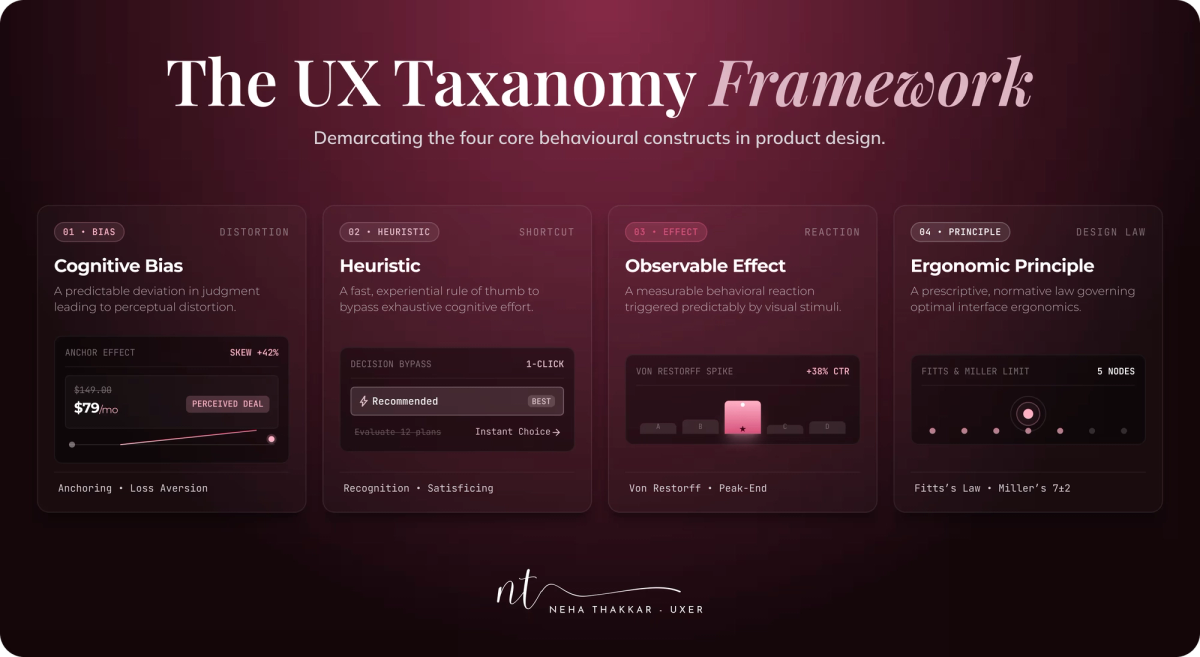
A cognitive bias is a systematic, predictable deviation from "rational" judgment, a consistent way our thinking departs from what pure logic would produce. The word systematic is the important part. Biases aren't random errors or stupidity; they're patterned, which is exactly why they're useful to designers. If they were random, you couldn't design around them.
Biases exist because the brain runs on shortcuts. Psychologists call these shortcuts heuristics: fast, frugal rules of thumb that let us act without exhaustively analyzing every situation. Most of the time, heuristics are brilliant. They let you cross a street, judge a stranger's mood, or pick a lunch spot without grinding through a decision tree. A cognitive bias is what happens when one of those shortcuts misfires, when the rule that usually serves us well produces a predictable error in a particular context.
This distinction, popularized by Daniel Kahneman and Amos Tversky in the 1970s, matters for two reasons. First, it means biases are not a defect to be "fixed." They're the cost of an otherwise efficient mind. You cannot debias a user, and you shouldn't try. Second, it means our terminology needs discipline. A lot of UX writing throws "bias" at anything vaguely psychological. But some of the concepts we'll discuss are true biases, some are heuristics, some are memory effects, and some are persuasion principles. Blurring them makes for confident-sounding articles and sloppy thinking. I'll flag what each one actually is as we go.
The goal of good UX, then, isn't to eliminate bias. Human cognition is inherently biased, and the interface can't change that. The goal is to understand how those biases shape decisions and to design experiences that reduce unnecessary cognitive effort, without manipulating people. Hold onto that sentence. It's the spine of this entire article, and we'll return to it.
The cognitive biases (and related effects) UX designers should understand
Before the entries, a quick map of the terrain, because precision here is what separates a thoughtful piece from a listicle. Not everything below is a "bias."
| Concept | What it actually is | One-line summary | Evidence strength |
|---|---|---|---|
| Anchoring | Cognitive bias | The first number/frame skews later judgment | Strong |
| Confirmation bias | Cognitive bias | We favor info that fits existing beliefs | Strong |
| Framing effect | Cognitive bias | The same fact, framed differently, changes choices | Strong |
| Loss aversion (incl. endowment) | Cognitive bias | Losses loom larger than equivalent gains | Strong but debated |
| Status quo bias (default effect) | Cognitive bias | We stick with the current/default option | Strong |
| Present bias | Cognitive bias | We overweight immediate over future costs/rewards | Strong |
| Decoy effect | Cognitive bias | A third "trap" option shifts choice between two | Strong |
| IKEA effect | Cognitive bias | We overvalue what we helped build | Moderate |
| Sunk cost fallacy | Cognitive bias | We keep investing because we already invested | Strong |
| Availability | Heuristic | We judge likelihood by what comes to mind easily | Strong |
| Social proof / bandwagon | Persuasion principle / bias | We copy what others do under uncertainty | Strong |
| Scarcity | Persuasion principle | Limited availability raises perceived value | Strong |
| Serial position (primacy + recency) | Memory effect | We remember firsts and lasts, forget the middle | Strong |
| Peak-end rule | Memory/evaluation heuristic | We judge experiences by their peak and end | Strong |
| Choice overload | Effect (contested) | Too many options can reduce action/satisfaction | Contested, context-dependent |
Now the entries. Each follows the same structure so you can scan.
True cognitive biases
Anchoring bias (cognitive bias)
- What it is: We rely too heavily on the first piece of information we encounter, using it as a reference point for everything after.
- Why we do it: Estimating true value is hard, so the mind grabs the nearest reference and adjusts from it, usually not enough (Tversky & Kahneman, 1974).
- Everyday example: A jacket marked "was $300, now $150" feels like a deal because $300 anchored you.
- UX example: A pricing page that lists the highest tier first, so the middle plan reads as reasonable; or a "recommended" storage amount pre-set high.
- Effect on behavior: Shifts perceived value and willingness to pay, and sets expectations before evaluation even begins.
- What designers can do: Choose your first-shown value deliberately, and anchor against honest reference points (a real prior price, a genuine typical usage).
- Ethical note: Fabricated "original" prices that never applied are deceptive and, in many regions, illegal.
Confirmation bias (cognitive bias)
- What it is: We seek, interpret, and remember information in ways that confirm what we already believe.
- Why we do it: Updating beliefs is effortful; confirming them is comfortable and cognitively cheap (Nickerson, 1998).
- Everyday example: Once you decide a phone brand is "the best," every review you read seems to prove it.
- UX example: A user who expects your app to be "complicated" interprets a minor hiccup as evidence and disengages. Also huge in research, more on that later.
- Effect on behavior: Reinforces first impressions and makes early experiences disproportionately sticky.
- What designers can do: Invest heavily in first impressions and onboarding; a strong early signal becomes the belief users then confirm.
- Ethical note: Mostly a design-quality issue rather than a manipulation risk, though it's easy to exploit by telling people only what they want to hear.
Framing effect (cognitive bias)
- What it is: The same information produces different decisions depending on how it's presented (Tversky & Kahneman, 1981).
- Why we do it: We react to the emotional tone of information before we process its literal content.
- Everyday example: "90% fat-free" outsells "10% fat," though they're identical.
- UX example: "Save $120/year" versus "$10/month," or "Keep my discount" versus "No thanks" on a retention screen.
- Effect on behavior: Nudges choices toward whichever frame feels more positive or lower-risk.
- What designers can do: You must choose a frame, so choose one that's both truthful and clear. Frame around user benefit, not obfuscation.
- Ethical note: Framing crosses into manipulation when it hides material facts (a "free" plan that quietly auto-bills).
Loss aversion (cognitive bias; includes the endowment effect)
- What it is: Losses feel roughly larger than equivalent gains, so we work harder to avoid losing than to gain. A close cousin, the endowment effect, means we value things more once we own them (Kahneman, Knetsch & Thaler, 1990).
- Why we do it: Likely an evolutionary asymmetry, missing a threat was historically costlier than missing an opportunity.
- Everyday example: You'd feel worse losing $50 than you'd feel good finding $50.
- UX example: Free trials that grant premium features (which now feel like yours to lose), or streak mechanics that make lapsing feel like a loss.
- Effect on behavior: Increases retention and reluctance to give something up, but also anxiety and inertia.
- What designers can do: Let people experience real value before asking for commitment; frame genuine losses honestly.
- Ethical note: Manufacturing fake loss ("you'll lose your cart forever!") to pressure users is a dark pattern. Also worth knowing: some researchers (Gal & Rucker, 2018) argue loss aversion is overstated, so don't build your whole strategy on it.
Status quo bias and the default effect (cognitive bias + its design lever)
- What it is: We tend to stick with the current or pre-selected option. The default effect is how this plays out in interfaces: whatever is pre-chosen usually wins (Samuelson & Zeckhauser, 1988; Johnson & Goldstein, 2003).
- Why we do it: Changing a default takes effort and invites responsibility for a "wrong" choice; staying put is easy and feels endorsed.
- Everyday example: Most people never change their phone's default ringtone or settings.
- UX example: Default privacy settings, a pre-selected shipping speed, or opt-out newsletter checkboxes. Countries with opt-out organ donation have dramatically higher donor rates than opt-in ones.
- Effect on behavior: Powerfully steers outcomes with zero pressure, simply by what's set as default.
- What designers can do: Set defaults to what genuinely serves most users, and make changing them easy and visible.
- Ethical note: This is one of the most abused levers in design (pre-checked add-ons, sneaky opt-ins). A default should serve the user, not ambush them.
Present bias (cognitive bias)
- What it is: We overweight immediate costs and rewards relative to future ones (Laibson, 1997; O'Donoghue & Rabin, 1999).
- Why we do it: Immediate outcomes are concrete and felt; future ones are abstract and discounted.
- Everyday example: Choosing to watch one more episode tonight despite an early meeting.
- UX example: Users abandon a valuable but effortful setup now, even though it pays off later; or pick the plan with no upfront cost over the better long-term deal.
- Effect on behavior: Drives drop-off on anything effortful and delays follow-through.
- What designers can do: Reduce immediate effort (fewer steps, autofill), and surface a small immediate reward for actions that pay off later.
- Ethical note: Fine when you're lowering friction; questionable when you exploit impatience to push impulsive commitments.
Decoy effect (cognitive bias; asymmetric dominance)
- What it is: Adding a deliberately inferior third option makes one of the original two look clearly better (Huber, Payne & Puto, 1982).
- Why we do it: Comparison is hard, so an "obviously worse" option gives the mind an easy relative judgment.
- Everyday example: The medium popcorn priced just below the large, making the large feel smart.
- UX example: A middle pricing tier no one is meant to buy, positioned to make the premium tier look like the obvious value.
- Effect on behavior: Predictably shifts choice toward the target option.
- What designers can do: Structure tiers to help users find genuine value, not to trick them past the plan that actually fits.
- Ethical note: Fine as a clarity aid; manipulative when the decoy exists purely to inflate spend against the user's interest.
IKEA effect (cognitive bias)
- What it is: We place disproportionately high value on things we partially created (Norton, Mochon & Ariely, 2012).
- Why we do it: Effort creates a sense of ownership and pride that gets baked into the object.
- Everyday example: The wobbly bookshelf you assembled feels more valuable than a sturdier one you bought ready-made.
- UX example: Custom dashboards, curated playlists, configured workspaces, the more a user builds, the more attached (and less likely to churn) they become.
- Effect on behavior: Deepens engagement, perceived value, and switching cost.
- What designers can do: Invite meaningful personalization and investment early; make users' effort visible and rewarding.
- Ethical note: Healthy when the investment genuinely serves the user; a trap when it exists only to lock people in.
Sunk cost fallacy (cognitive bias)
- What it is: We continue an endeavor because of resources already spent, even when stopping is the rational move.
- Why we do it: Quitting means admitting the prior investment was "wasted," which triggers loss aversion.
- Everyday example: Finishing a bad movie "because we're already an hour in."
- UX example: Loyalty progress ("you're 80% to Gold") or a half-finished profile that keeps people engaged, sometimes past the point of real value.
- Effect on behavior: Sustains commitment and completion, for better or worse.
- What designers can do: Use visible progress to motivate genuinely worthwhile completion.
- Ethical note: Crosses the line when used to trap people in subscriptions or flows they'd rationally leave.
A heuristic worth knowing (not a bias)
Availability heuristic (heuristic)
- What it is: We judge how likely or important something is by how easily examples come to mind (Tversky & Kahneman, 1973).
- Why we do it: Ease of recall is a fast proxy for frequency, usually decent, sometimes badly wrong.
- Everyday example: After seeing news of a plane crash, flying feels riskier than driving, though it's far safer.
- UX example: A few vivid negative reviews outweigh a hundred positive ones; a recent outage makes users overestimate how "buggy" a product is.
- Effect on behavior: Distorts perceived risk, quality, and probability based on what's memorable, not what's true.
- What designers can do: Surface representative, balanced information (review distributions, not just extremes); make positive evidence memorable and accessible.
- Ethical note: Cherry-picking only vivid positives to distort perception edges toward manipulation.
Persuasion principles that exploit bias (not biases themselves)
Social proof (and the bandwagon effect) (persuasion principle; the bias underneath is the bandwagon effect)
- What it is: Under uncertainty, we look to others' behavior to decide what's correct (Cialdini). The bandwagon effect is the bias: adoption rises simply because others have adopted.
- Everyday example: Choosing the busy restaurant over the empty one.
- UX example: "12,000 five-star reviews," "trusted by 2M teams," "Sarah in Berlin just signed up."
- Effect on behavior: Reduces uncertainty and lowers the perceived risk of a choice.
- What designers can do: Show genuine, relevant social proof at moments of doubt.
- Ethical note: Fabricated numbers or fake "recent activity" popups are deceptive, and increasingly regulated.
Scarcity (persuasion principle)
- What it is: We assign more value to things that are limited or time-bound.
- UX example: "Only 2 seats left," countdown timers, limited drops.
- Effect on behavior: Adds urgency that can accelerate decisions, sometimes past careful judgment.
- What designers can do: Communicate real scarcity (true low stock, a genuine deadline).
- Ethical note: Fake scarcity is one of the most common dark patterns; users increasingly recognize and resent it.
(Related and worth a mention: authority bias, we defer to perceived experts and credible sources, which is why trust badges, certifications, and expert endorsements work when they're real.)
Memory effects (not biases)
Serial position effect (primacy and recency) (memory effect)
- What it is: We best remember the first items (primacy) and the last items (recency) in a series, and lose the middle.
- UX example: Navigation and menus, put the most important items first and last; the middle of a long list is a graveyard for attention.
- Effect on behavior: Shapes what users notice and retain from any ordered set.
- What designers can do: Place key actions and options at the start and end of lists and flows.
- Ethical note: Low risk; mostly a clarity and hierarchy tool.
Peak-end rule (memory/evaluation heuristic)
- What it is: We judge an experience largely by its most intense moment and its ending, not the average of every moment (Kahneman, Fredrickson, Redelmeier and colleagues).
- Everyday example: A great vacation with one awful travel day at the end is remembered as stressful.
- UX example: A celebratory success screen after a hard task, or a smooth, reassuring checkout confirmation, disproportionately shapes how the whole product is remembered.
- Effect on behavior: Drives overall satisfaction, word of mouth, and likelihood of return.
- What designers can do: Deliberately design emotional peaks and strong endings (confirmations, completions, offboarding).
- Ethical note: Low risk; genuinely improving the memorable moments is just good design.
The contested one (handle with honesty)
Choice overload (effect, empirically contested)
- What it is: The idea that too many options can reduce the likelihood of choosing and satisfaction with the choice, sometimes called the paradox of choice.
- The honest caveat: The famous "jam study" (Iyengar & Lepper, 2000) is widely cited, but a large meta-analysis (Scheibehenne, Greifeneder & Todd, 2010) found the average effect is near zero. A later review (Chernev, Böckenholt & Goodman, 2015) showed it's real but heavily context-dependent, strongest when options are complex, hard to compare, the stakes feel high, and the user lacks expertise.
- Why it can happen: Too many comparable options raise cognitive load and decision time (related to Hick's Law).
- UX example: An overwhelming filterless product grid, or a settings page with fifty equally-weighted toggles.
- What designers can do: Reduce and structure choices (curate, categorize, set smart defaults, highlight a recommended option), especially in the high-risk contexts above.
- Ethical note: Simplifying to help is good; removing genuinely needed options to steer people is not.
If you want the deep version of this one, I wrote a whole piece on decision paralysis in UX.
From a list of biases to a map
Here's the problem I kept hitting. A list like the one above is useful, but it's inert. You finish reading it, nod, and then sit down to design a checkout flow and think... okay, but which of these fourteen things actually matters right now, on this screen? A flat list tells you what biases exist. It doesn't tell you where they show up or when to worry about them.
The other problem with the standard "N biases every designer should know" format is that it implies each bias lives in one tidy place. It doesn't. Anchoring shapes both the first thing a user sees and how they later compare options. Availability distorts both how users interpret information and what they remember afterward. Bias isn't a set of discrete traps scattered around your product; it's a current running through the entire decision.
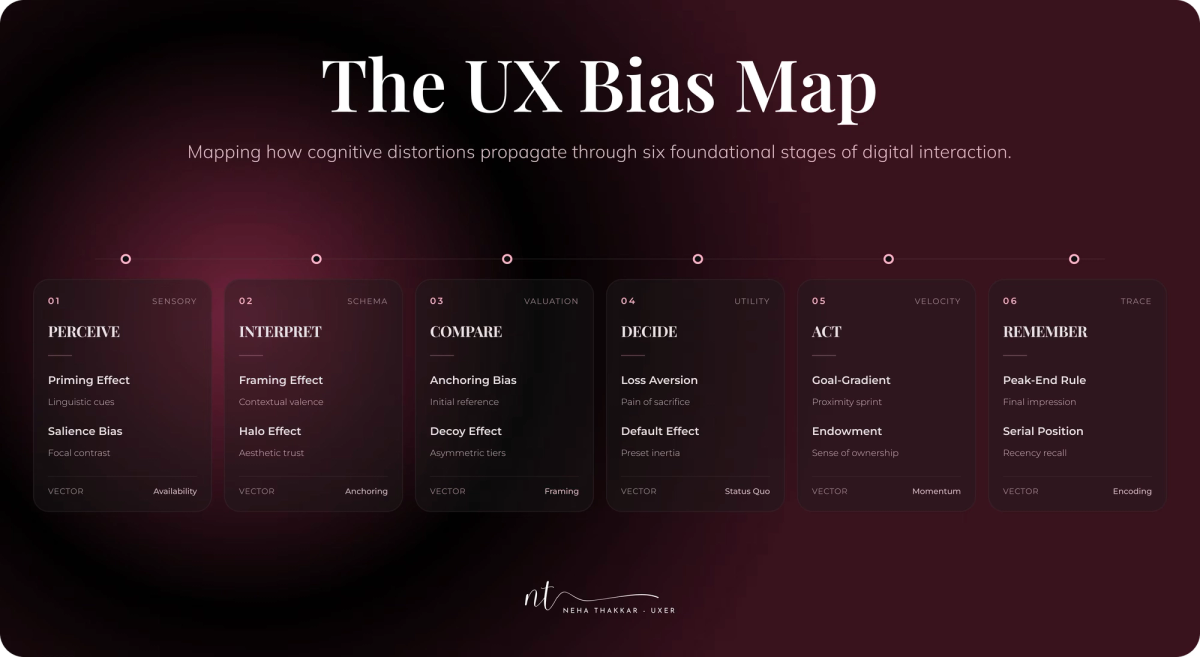
So I started sketching the biases against the stages of a single decision, the actual cognitive sequence a person moves through, from noticing something to remembering it later. That sketch became the framework I now use, and it's the part of this article I most want to share.
A note on what this is and isn't. The UX Bias Map is my framework, a designer's mental model, not an established psychological theory. The individual biases are well-researched (sources at the end); the arrangement is my synthesis. I'll also be upfront that mapping biases onto journey or decision stages isn't a brand-new idea, others have grouped biases by rough phases of a customer journey. What I've tried to do differently is three things: frame the stages as cognitive processing rather than a marketing funnel, deliberately place the same bias in multiple stages to show how it mutates, and (later) extend the same lens to researchers and designers, not just users. Use it as a thinking tool, not a law of nature.
The UX Bias Map
The map has six stages, following how a person actually processes a decision:
PERCEIVE → INTERPRET → COMPARE → DECIDE → ACT → REMEMBER
Here's the whole thing at a glance, then we'll walk through each stage as a story.
| Stage | What's happening in the user's head | Biases most active here | Designer's job |
|---|---|---|---|
| Perceive | Noticing and first-processing information | Primacy (serial position), anchoring, framing, salience (Von Restorff) | Control what gets seen first and how it's framed |
| Interpret | Making sense; judging meaning and risk | Confirmation bias, availability heuristic, framing | Support accurate interpretation; surface balanced info |
| Compare | Evaluating alternatives against each other | Anchoring, decoy effect, choice overload | Make comparison easy and honest |
| Decide | Committing to one option | Loss aversion, status quo/default, social proof, scarcity | Reduce friction and fear; guide without coercing |
| Act | Following through on the decision | Present bias, status quo bias, sunk cost | Lower immediate effort; sustain momentum |
| Remember | Recalling and evaluating afterward | Peak-end rule, recency (serial position), availability | Design strong peaks and endings |
Notice the repeats. Anchoring appears twice, framing twice, availability twice, status quo twice, serial position at both ends. That's not sloppiness; it's the point. Let's walk through it.
Perceive
Before a user can evaluate anything, they have to notice it, and the mind is doing a lot of filtering in these first moments. What appears first carries extra weight (primacy, the front half of the serial position effect). The first number or option shown becomes the anchor for everything after. How information is framed colors the very first read. And whatever is visually distinct grabs attention (the Von Restorff / isolation effect).
Product example: On a SaaS pricing page, the plan you place first and the plan you visually isolate as "Most Popular" don't just get seen more, they reshape how every other plan is judged. Lead with a high anchor and the mid tier feels moderate; lead with the cheapest and the expensive ones feel greedy.
What designers can do: Be deliberate about order and emphasis. Decide what the first impression, first number, and most salient element should be, because users will build their whole evaluation on top of it. This is a place to guide clarity, and also a place where dishonest anchoring does real damage.
Interpret
Now the user is making meaning: is this relevant to me? Is it trustworthy? Is it risky? Two forces dominate. Confirmation bias means people fit new information into beliefs they already hold, so a user who arrived skeptical reads ambiguous cues as confirmation. The availability heuristic means they judge quality and risk by whatever comes to mind most easily, a couple of vivid one-star reviews, a friend's offhand complaint, a recent outage.
Product example: On a product page, a user deciding whether your tool is "reliable" isn't computing your uptime statistics. They're recalling the last thing they heard about you and pattern-matching your page against their prior expectation. Two dramatic negative reviews at the top can outweigh a 4.7 average.
What designers can do: Surface representative information rather than extremes, show the distribution of reviews, not just the loudest ones. Reinforce accurate beliefs early and give skeptical users concrete, memorable evidence to recall.
Compare
Here the user weighs alternatives directly, and comparison is cognitively expensive, so shortcuts take over. Anchoring returns as the reference point against which options are judged. The decoy effect can quietly steer which option looks best. And if the option set is large, complex, or hard to differentiate, choice overload can stall the whole thing (remember: real but context-dependent).
Product example: A plan comparison table where one column is subtly framed as the reference, or a three-tier layout where the middle tier is engineered to make the top tier look like the obvious value. Or a filterless catalog with 200 near-identical items where users simply give up.
What designers can do: Make honest comparison genuinely easy, clear differentiators, comparison tables, sensible categories, and a defensible recommended option. The line to watch: are you helping people compare, or engineering the comparison so they can't see straight?
Decide
This is the moment of commitment, and it's the most bias-dense stage of all. Loss aversion makes people reluctant to give something up or risk a wrong choice. Status quo bias and defaults mean the pre-selected path usually wins. Social proof reduces uncertainty by showing what others chose. Scarcity adds urgency that can tip a wavering user into action.
Product example: A checkout with a sensible default shipping option, a reassuring "30-day free returns" (defusing loss aversion), "12,000 teams use this" (social proof), and, if true, "2 left at this price" (scarcity). Stacked honestly, these reduce anxiety and help a ready user act. Stacked dishonestly, they become a pressure machine.
What designers can do: Reduce the fear and friction around committing, clear defaults, reversibility, honest reassurance, real social proof. This is exactly where "designing with psychology" and "designing to exploit psychology" diverge most sharply (next section).
Act
Deciding isn't doing. Plenty of users decide to sign up, then never finish setup. In this stage, present bias is the enemy: the effort is now, the payoff is later, so people procrastinate or abandon anything that feels like work. Status quo bias shows up again as sheer inertia (not switching, not migrating, not changing the setting). And sunk cost can help sustain follow-through once someone's invested.
Product example: A powerful analytics tool whose value depends on connecting data sources, a tedious, effortful task with a delayed payoff. Present bias predicts mass drop-off right here, no matter how good the eventual value is.
What designers can do: Crush the immediate effort (autofill, smart imports, "we'll do this for you"), break big tasks into small wins, and give an early taste of the payoff so the future benefit feels present. Visible progress leverages sunk cost in the user's favor.
Remember
After it's over, the experience gets compressed into a memory, and that memory, not the actual minute-by-minute reality, drives whether users return and recommend. The peak-end rule means the emotional high point and the ending dominate. Recency (the back half of serial position) means the last interaction lingers. And availability returns: the most memorable moment becomes the story users tell themselves and others.
Product example: Two onboarding flows can be equally efficient, but the one that ends on a small celebratory win and a clear "here's what you can do now" is remembered as better, and gets recommended more. Likewise, a great product with a painful cancellation flow leaves a sour final memory that poisons the whole recollection.
What designers can do: Deliberately craft peaks (moments of delight, a genuine "aha") and invest in endings, confirmations, completions, even offboarding. The last taste is the one people keep.
The takeaway from the map
The reason to think in stages isn't to file each bias into one box. It's the opposite: to see that the same bias wears different clothes at different moments, and that a decision is a sequence where influence compounds. A user anchored in Perceive, reassured against loss in Decide, and delighted at the End is a fundamentally different user from one who was overloaded in Compare and frustrated in Act. The map is just a way to ask, at any screen: which stage is this, and which biases are most alive here right now?
Designing with bias vs designing against bias
Once you can see where bias operates, the real question becomes what to do about it, and this is where I want to be precise, because "using psychology" has a bad reputation it only sometimes deserves.
There's a meaningful difference between designing with bias and designing against the user. Designing with bias means working with the grain of human cognition to make good decisions easier: reducing unnecessary effort, providing sensible defaults, simplifying and structuring choices, surfacing relevant information at the right moment, making consequences clear, and always preserving the user's control and ability to reverse course. You're lowering the cognitive tax on a decision the user genuinely wants to make.
Designing against the user means using those same forces to extract a decision they wouldn't otherwise make: hiding consequences, manufacturing pressure, burying the exit. Same psychology, opposite intent.
A concrete way to hold the distinction: for any bias-aware pattern, ask "if the user fully understood what I'm doing here, would they thank me or feel tricked?" A sensible default that saves them effort? Thank you. A pre-checked $9/month add-on they didn't notice? Tricked. That single question does more ethical work than any framework.
When UX becomes manipulation
The uncomfortable truth is that every bias in this article can be used to help or to exploit. The line isn't the technique; it's whether the design serves the user's goals or subverts them. Dark patterns, a term coined by UX researcher Harry Brignull, are interfaces crafted to trick users into doing things they didn't mean to. Researchers have since built taxonomies of them (Gray et al., 2018), and regulators (the FTC, the EU) are now actively penalizing them.
The clearest way to see the boundary is to put the honest and the manipulative versions of the same technique side by side.
| Bias / principle | Designing with psychology (ethical) | Designing to exploit it (dark pattern) |
|---|---|---|
| Defaults | Pre-select the option that serves most users; easy to change | Pre-check paid add-ons or opt-ins users won't notice |
| Social proof | Show genuine reviews and real usage numbers | Fake "someone just bought this" popups and invented counts |
| Scarcity | Communicate real low stock or a true deadline | Fake countdowns that reset; "only 1 left" that never changes |
| Loss aversion | Honestly note what a user loses by downgrading | "You'll lose everything forever!" pressure to prevent cancellation |
| Framing | Frame a real benefit clearly and truthfully | Frame to hide fees, auto-renewal, or the real total |
| Friction (present bias) | Remove friction from the action users want | Add friction only to the exit ("roach motel" cancellation) |
Notice the pattern in the right column: it either hides information, manufactures a falsehood, or asymmetrically adds friction to the choice that helps the user. Those are the three tells of manipulation. Persuasion presents a genuine case honestly and leaves the user free to choose; manipulation removes that freedom or the information needed to exercise it. Behavioral design sits in between and can tip either way, which is exactly why intent and transparency matter so much. (I go deeper on this in behavioral design and cognitive biases in UX.)
This isn't just ethics for its own sake. Manipulative design wins in the short term and loses in the long term: it erodes trust, invites regulation, and, as users get more bias-literate, increasingly just doesn't work.
The designer is biased too
Here's the part most bias articles skip, and it's the one that separates a real practitioner from someone who thinks bias is only a user problem. Cognitive bias doesn't switch off when you move from the user's side of the screen to yours. It shapes how we research and how we design.
Users are biased, as we've covered: a user anchors on the first price they see.
Researchers are biased too. A researcher can anchor on the first hypothesis they form and then, through confirmation bias, notice the evidence that supports it and wave away the evidence that doesn't. Leading questions in an interview are often confirmation bias leaking out ("That was easy, right?"). The availability heuristic makes the most vivid, quotable participant feel representative of everyone. Even sample recruiting can quietly select for people likely to confirm what we hoped.
Designers are biased too. We fall in love with our own solutions (a cousin of the IKEA effect, we overvalue what we built). We assume we're representative of our users (we are almost never). We interpret an ambiguous usability session as confirming the problem we already expected to find. And the curse of knowledge means we literally cannot un-see how our own design is "supposed" to work, which is why it always feels more obvious to us than to a first-timer.
The defenses are the same ones good teams already preach, and now you can see why they work: predefine what you expect before research so you can't quietly move the goalposts; ask neutral, non-leading questions; separate observation from interpretation; use multiple evaluators to cancel out individual blind spots; and, above all, test with real users instead of trusting your own intuition. This is a big reason rigorous UX research methods exist, not because researchers are careless, but because everyone, expert included, is running on the same biased hardware.
Conclusion
Cognitive biases in UX aren't a glitch to be patched or a trick to be deployed. They're the operating conditions of the human mind, present in every user, every researcher, and every designer, whether we acknowledge them or not. Pretending users are rational produces products that fail in the real world. Exploiting their irrationality produces products that succeed briefly and betray the trust that makes them last.
The path between those two failures is the whole craft. Understand where bias shapes a decision, use the UX Bias Map, or your own version of it, to ask which forces are alive at each stage, and then design to reduce the unnecessary cognitive effort between a person and a choice they genuinely want to make. Preserve their information. Preserve their control. Design the peaks and the endings they'll remember.
Good UX doesn't remove human psychology from the interface. It understands it, and uses that understanding to help people make clearer, more informed decisions. That's the difference between a designer who happens to know some psychology terms and one who can actually be trusted with them.
Frequently asked questions
Cognitive biases in UX are systematic, predictable ways that users' thinking departs from pure logic while they use a product, shaping how they perceive, interpret, compare, decide, act, and remember. They arise from mental shortcuts (heuristics) and can't be removed, so good UX aims to understand them and reduce unnecessary cognitive effort rather than exploit them.
A heuristic is a mental shortcut the brain uses to decide quickly; a cognitive bias is the systematic error that shortcut can produce in certain contexts. For example, the availability heuristic (judging by ease of recall) is the shortcut, and overestimating rare-but-vivid risks is the resulting bias. Not every psychological effect is a "bias", memory effects like the peak-end rule and persuasion principles like scarcity are related but distinct.
The UX Bias Map is a framework (a designer's mental model, not an established psychological theory) that places cognitive biases across six stages of a user's decision: Perceive, Interpret, Compare, Decide, Act, and Remember. Its main idea is that the same bias can influence users at multiple points, so designers should ask which biases are most active at each stage rather than treating each bias as a one-off trap.
It depends entirely on intent and transparency. Designing with psychology, sensible defaults, honest social proof, clear framing, reduces effort and helps users make choices they actually want. Designing to exploit psychology, fake scarcity, hidden fees, pre-checked add-ons, hard-to-find exits, tricks users against their interest and is known as a dark pattern. The test: would users thank you or feel tricked if they saw exactly what you did?
The most broadly useful are anchoring, framing, loss aversion, status quo bias (defaults), social proof, and the peak-end rule, because they touch pricing, onboarding, checkout, retention, and overall satisfaction. But the more useful skill is knowing where each one operates in the user's decision, which is what the UX Bias Map is for.
Yes. Researchers can anchor on their first hypothesis and confirm it through leading questions; designers can fall in love with their own solutions and assume they represent their users. Cognitive bias is human hardware, not a user-only problem, which is why neutral research methods, multiple evaluators, and testing with real users matter so much.