
UX Research
Usability Testing 101: The Complete Beginner's Guide (2026)

Experience Designer
A complete, beginner-friendly guide to usability testing: what it is, why and when to do it, the types, how to run one, how to find participants, and what it costs
Everything you need to run your first usability testing session with confidence: what it is, why it matters, when to use it, the types, how to recruit participants, how to facilitate like a pro, and what it all costs.
Who this is for: UX and product designers, PMs, founders, researchers, students, and anyone who wants to stop guessing whether their product actually works. The one-sentence version: Usability testing is watching real people use your product so you can find the problems before your users do.
The most expensive assumption in product design
Picture this. Your team spent three months building a slick new checkout flow. Everyone loves it. The buttons are gorgeous, the animations are buttery, the code is clean. You ship it. And then... conversions drop 12%.
What happened? Somewhere in that beautiful flow, real humans got confused, hesitated, and bailed. Nobody on the team saw it coming, because everybody on the team already knew how it was supposed to work. That's the trap: you are the worst possible judge of your own design, because you can't un-know what you know.
Usability testing is the cure. It's the single most reliable way to see your product through fresh, confused, wonderfully honest eyes, before those confused eyes cost you real money. This guide is your complete Usability Testing 101: by the end, you'll know exactly what usability testing is, when to reach for it, how to run a session without embarrassing yourself, and how to do it whether your budget is $0 or $50,000.
Let's get into it.
What is usability testing?
Usability testing is a UX research method where you observe real, representative users attempting to complete realistic tasks with your product, so you can identify where they struggle, get confused, or succeed.
Here's the crucial mindset shift that trips up beginners: you are not testing the user. You are testing the design. When someone can't find the "checkout" button, that's not their failure, it's your interface's. In usability testing, every fumble, hesitation, and puzzled "wait, where do I click?" is pure gold, because it points to something you can fix.
A usability test almost always involves a few core ingredients: a real person (the participant), a set of realistic things to do (tasks), someone or something capturing what happens (a facilitator and/or recording tool), and a product or prototype to poke at. The participant works through the tasks, ideally thinking aloud the whole time, while you watch, listen, and take notes on where the experience breaks down.
And here's the beautiful part: usability testing works at any fidelity. You can test a paper sketch, a clickable Figma prototype, a beta build, or a live product. The method flexes to whatever you've got.
Why do usability testing? (The payoff)
If you need to convince a skeptical boss (or yourself) that usability testing is worth the time, here's your ammunition.
It catches expensive problems while they're still cheap to fix.
The cost of fixing a usability issue skyrockets the later you find it. A confusing flow caught in a prototype costs an afternoon; the same flow caught after launch costs an engineering sprint, lost customers, and a pile of support tickets. Usability testing shifts problem-finding to the cheapest possible moment.
It replaces opinions with evidence.
Every team has that meeting where the loudest voice wins. Usability testing ends those debates instantly. It's remarkably hard to argue with a video of five people getting stuck in the exact same place.
It reveals what analytics can't.
Analytics tell you what happened (70% dropped off at step 3). Usability testing tells you why (they thought step 3 was the final step and assumed they were done). You need both, but only usability testing gives you the human reason behind the number. (For the full picture of where this fits, see our guide to UX research methods.)
It builds empathy across the whole team.
There's a special kind of humility that hits an engineer or executive watching a real person struggle with something they were sure was "obvious." Usability testing turns "the user" from an abstraction into a specific, memorable human, and suddenly everyone cares.
It reduces risk.
Every design decision is a bet. Usability testing stacks the odds in your favor by grounding those bets in observed behavior instead of wishful thinking.
In short: usability testing is cheaper than rework, faster than failure, and more persuasive than any slide deck.
When should you choose usability testing?
Usability testing is powerful, but it's not the answer to every research question. Knowing when to reach for it (versus another method) is what separates thoughtful researchers from box-tickers.
Choose usability testing when you have something to test and a "can they use it?" question. If your question is about behavior and interaction, "Can people complete this task? Where do they get stuck? Is this flow intuitive?", usability testing is your tool.
Reach for a different method when your question is different:
- If you're asking "what do users even need?" (before you've designed anything), start with user interviews and discovery research, not usability testing.
- If you're asking "how should we organize our navigation?", use card sorting and tree testing.
- If you're asking "which version converts better at scale?", use A/B testing.
- If you're asking "where exactly are users dropping off?", start with analytics, then use usability testing to learn why.
Test at every stage, not just at the end. A common rookie mistake is treating usability testing as a final exam right before launch. In reality, the best teams test continuously:
- Early (formative): test low-fi wireframes and prototypes to shape the design while changes are cheap.
- Mid: test interactive prototypes to validate flows before development.
- Late / post-launch (summative): test the built product to benchmark performance and catch remaining issues.
The mantra: test early, test often, test cheap. A little usability testing throughout beats one big study at the finish line.
The core elements of a usability test
Every usability test, whether it's a $0 hallway session or a $30,000 lab study, is built from the same handful of elements. Get these right and the rest follows.
1. The facilitator.
The person who guides the session, gives tasks, asks probing questions, and (most importantly) stays quiet and neutral while the participant works. Good facilitation is a genuine skill, we'll cover it below.
2. The participant.
A real, representative user from your target audience. The quality of your usability testing depends enormously on recruiting the right people (more on this shortly).
3. Tasks and scenarios.
The realistic goals you ask participants to accomplish, framed as scenarios ("Imagine you want to return a pair of shoes you bought last week. Show me how you'd do that."). Tasks are the heart of usability testing, vague or leading tasks ruin the whole session.
4. The think-aloud protocol.
Asking participants to narrate their thoughts out loud as they go ("Okay, I'm looking for a menu... I expected it up here..."). This turns invisible confusion into observable data.
5. Metrics and observations.
What you measure and note, success rates, time on task, errors, and qualitative observations about hesitation, frustration, and delight.
6. The environment and tools.
Where and how the session happens: in person, remote over video, or asynchronously through an unmoderated platform, plus whatever you use to record and take notes.
The types of usability testing
"Usability testing" is an umbrella term covering several flavors. The right type depends on your question, timeline, and budget. Let's break down the main dimensions.
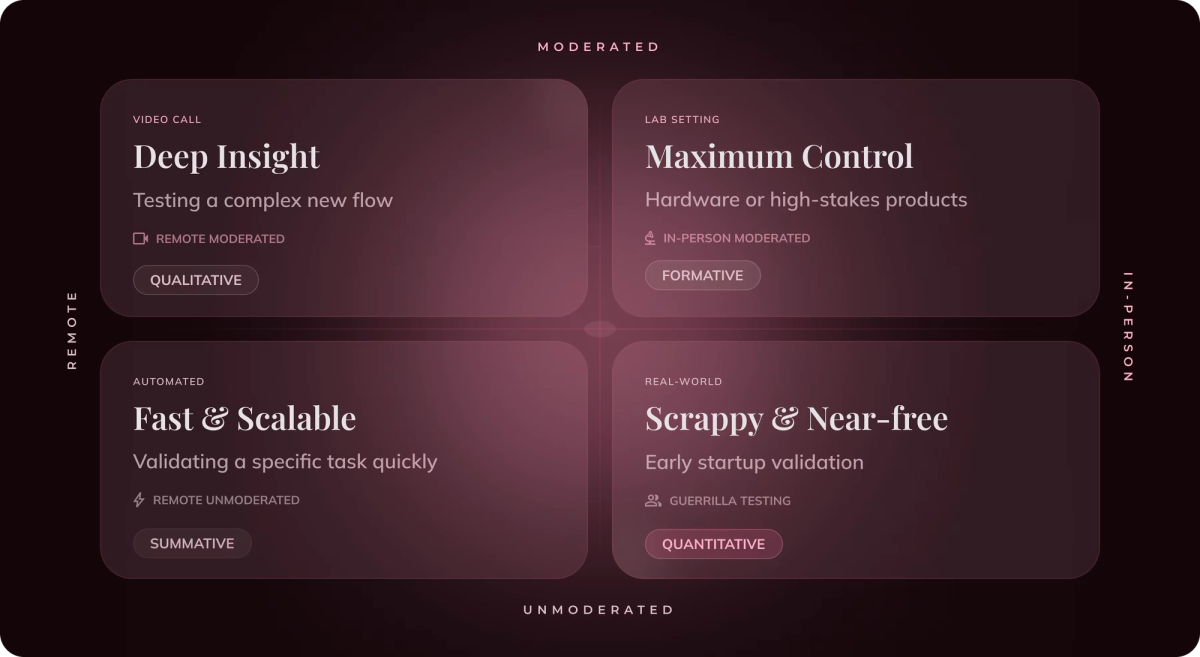
Moderated vs. unmoderated usability testing
This is the biggest fork in the road.
Moderated usability testing has a live facilitator guiding the session in real time, in person or over video. The facilitator can probe ("What made you pause there?"), adapt, and dig into the why behind behavior.
- Best for: complex flows, early-stage research, and rich qualitative insight.
- Pros: deep understanding, ability to follow up and clarify, catches the unexpected.
- Cons: slower, more resource-intensive, and requires facilitation skill.
Unmoderated usability testing has participants complete tasks on their own, usually through a platform that records their screen, voice, and clicks for you to review later.
- Best for: speed, scale, testing specific tasks, and tight budgets.
- Pros: fast, cheap, run many sessions in parallel, participants test in their own environment.
- Cons: no ability to probe or clarify; you see what happened but must infer the why.
Rule of thumb: use moderated usability testing when you need depth and the why; use unmoderated when you need speed, scale, and quantifiable answers to specific questions.
Remote vs. in-person usability testing
Remote usability testing happens over the internet (video call for moderated, or a platform for unmoderated). It has become the default for most teams because it's cheaper, faster, removes geographic limits, and lets people test in their natural environment.
In-person (lab) usability testing brings participants into a physical space. It offers maximum control, richer body-language cues, and the ability to test hardware or physical-digital experiences, but it's slower, pricier, and location-bound.
For most digital products in 2026, remote usability testing covers the vast majority of needs.
Qualitative vs. quantitative usability testing
Qualitative usability testing focuses on observations and insights, the why. It uses a small number of participants and is all about spotting problems and understanding behavior. This is the most common kind.
Quantitative usability testing focuses on metrics, success rates, time on task, error rates, across a larger sample, so you can measure and benchmark performance statistically.
Formative vs. summative usability testing
Formative usability testing happens during design to shape and improve it, small, frequent, diagnostic. ("What's broken and how do we fix it?")
Summative usability testing happens after a design is complete to evaluate and benchmark it. ("How well does this perform overall, and how does it compare?")
Guerrilla usability testing
Guerrilla usability testing is the scrappy, low-cost approach: approach people in a coffee shop, library, or your office lobby, and ask them to try a quick task on your prototype in exchange for a coffee. It's fast, nearly free, and shockingly effective for catching big, obvious problems, though the participants are less targeted. Perfect for startups and early validation.
A quick note on related methods
You'll often see these mentioned alongside usability testing: first-click testing (where do people click first?), tree testing (can they find things in your navigation structure?), and A/B testing (which version performs better with live traffic?). These are complementary research methods, not usability testing itself, but they live in the same toolkit.
How many participants do you actually need?
This is the question everyone asks, and the answer surprises people: you need far fewer than you think.
For qualitative usability testing, the widely cited guideline (from research by the Nielsen Norman Group) is that around five participants will uncover roughly 85% of the usability problems in a design. After five, you start hearing the same issues repeat, and the return on each additional participant drops sharply.
So instead of running one giant study with 30 people, the smarter play is to run several small rounds of five, fixing issues between each round. Test five, fix, test five more, fix again. This iterative approach finds and solves far more problems than a single big test.
The exceptions: quantitative usability testing (where you need statistical confidence) requires larger samples, often 20+ participants per group. And if you have very distinct user segments (say, first-time users and power users), aim for about five participants per segment.
How to find the right participants
Here's a hard truth: five sessions with the wrong participants are worse than no testing at all, because they give you false confidence and send you off fixing the wrong things. Recruiting is where usability testing quietly succeeds or fails.
Start with a clear definition of your target user. Who are you actually designing for? Sketch out the characteristics that matter: behaviors, experience level, demographics, and, most importantly, relevant context (e.g., "people who've booked travel online in the last six months").
Write a screener survey. This is a short questionnaire that filters candidates so only qualified people get in. Screen in the people who match your criteria and screen out those who don't (including "professional testers" who do too many studies, and industry insiders like designers, who won't behave like normal users).
Avoid the convenience trap. Testing your product on your coworkers, your friends, or your own team is tempting and almost always misleading. They know too much, they want to please you, and they aren't your users. Recruit real, representative outsiders whenever you possibly can.
Where to find participants:
- Your existing users: recruit from your customer base via email or in-app prompts (great for testing with real users, but they already know your product).
- Recruiting panels and platforms: services with participant pools (and testing tools like Maze, Lyssna, and UserTesting) can find and schedule targeted participants for you, fast, in exchange for a fee. See the research section of our UI/UX design tools guide for options.
- Social media and communities: post in relevant groups, forums, or subreddits.
- Guerrilla recruiting: approach people in public spaces for quick, informal sessions.
Offer a fair incentive. People are giving you their time and attention, so compensate them, gift cards, cash, or product credit. Incentives typically range from around $25 for a short unmoderated task to $75–$150+ for a longer moderated session, and more for hard-to-reach professionals (doctors, developers, executives can run into the hundreds).
Always recruit a spare. No-shows happen. Recruit one or two more participants than you need so a cancellation doesn't sink your day.
How to facilitate a usability test (step by step)
Facilitation is where nerves kick in for beginners, but it's a learnable craft. Here's the full playbook.
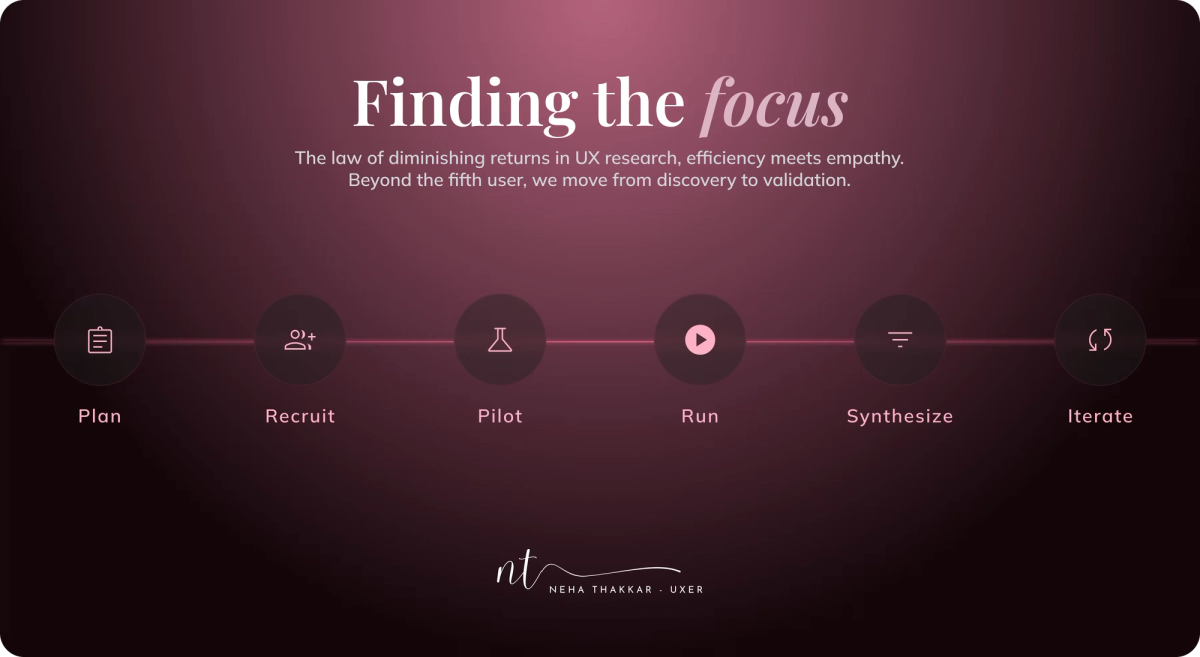
Before the session
1. Define your goal. What do you want to learn? "Can users successfully add an item to their cart and check out?" A focused goal keeps the whole session on track.
2. Write realistic tasks and scenarios. Frame tasks as real-world goals, not instructions. Say "You need a birthday gift for a friend under $50, find something you'd buy," not "Click the search bar, type 'gift,' and filter by price." The second version tells them exactly what to do, which defeats the entire purpose.
3. Write a test plan and script. A simple document with your goal, participant criteria, tasks, and the questions you'll ask. A script keeps every session consistent and comparable.
4. Run a pilot test. Do one practice run with a colleague to catch broken tasks, confusing wording, or tech glitches before they waste a real session. Never skip the pilot, it will save you every time.
During the session
5. Set the participant at ease. Start by explaining that you're testing the product, not them, that there are no wrong answers, and that honest, even critical, feedback is exactly what you want. Relaxed participants give better data.
6. Encourage think-aloud. Ask them to narrate their thoughts continuously. When they go quiet, gently prompt: "What are you thinking right now?"
7. Stay neutral and resist the urge to help. This is the hardest and most important rule. When a participant gets stuck, let them struggle (within reason). Don't jump in, don't explain, don't nudge. Their struggle is your most valuable data. Bite your tongue and count to ten.
8. Don't ask leading questions. Ask "How was that experience?" not "That was easy, right?" Ask open, neutral questions that don't hint at the answer you're hoping for.
9. Observe everything. Watch not just success and failure, but hesitation, facial expressions, workarounds, and the little sighs of frustration. Note where expectations didn't match reality.
After the session
10. Debrief and ask follow-ups. Once tasks are done, ask broader questions about their overall impression, what stood out, and what they'd change.
11. Thank them and pay the incentive promptly.
12. Synthesize while it's fresh. Right after (or between) sessions, jot down key observations. After your round of five, look for patterns, issues that showed up repeatedly are your priorities. Then rank problems by severity and turn them into a clear, actionable report the team can rally around.
What can you measure? (Usability metrics)
Usability testing produces both qualitative insight and, if you want it, hard numbers. Common metrics include:
- Task success rate: the percentage of participants who complete a task. The most fundamental usability metric.
- Time on task: how long completion takes (faster usually means easier, in context).
- Error rate: how many mistakes participants make along the way.
- Task difficulty rating: ask participants to rate how hard a task felt (e.g., the Single Ease Question).
- System Usability Scale (SUS): a standardized 10-question survey producing a 0–100 usability score you can benchmark over time.
- Satisfaction and sentiment: how participants felt about the experience.
Qualitative sessions lean on observations; quantitative sessions lean on these metrics. Most real-world usability testing blends both.
How much does usability testing cost?
The honest answer: usability testing can cost almost nothing, or tens of thousands of dollars. It scales to your budget. Here's the realistic landscape.
Nearly free ($0–$100): DIY and guerrilla. Grab a prototype, recruit five people from your network or a coffee shop, run moderated sessions over a free video call, and record with free screen-capture. Your only real cost is small incentives (or literal coffee). For startups and students, this is the sweet spot, and it catches most major issues.
Moderate ($500–$5,000): tools plus recruited participants. Add an unmoderated testing platform subscription and use a recruiting panel to find targeted participants. Factor in incentives (roughly $25–$150 per participant) plus platform fees. A typical small, well-recruited round lands in the low four figures.
Premium ($5,000–$50,000+): agencies and lab studies. Hire a research agency or run formal moderated lab studies with specialized equipment, professional recruiting of hard-to-reach participants, and full reporting. This is enterprise territory for high-stakes products.
The main cost drivers to remember:
- Participant incentives (scales with how many and how hard-to-reach they are).
- Recruiting (DIY is free but slow; panels cost money but save time).
- Tools and platforms (free options exist; paid ones add speed and features).
- Your time (planning, facilitating, and analyzing is the biggest hidden cost of all).
The reassuring takeaway: the barrier to entry is basically zero. You do not need a budget to start usability testing. You need five people, a prototype, and a willingness to watch and listen.
Common usability testing mistakes to avoid
Even experienced teams stumble on these. Watch out for:
- Testing with the wrong participants (friends, coworkers, or people who don't match your users). Garbage in, garbage out.
- Writing leading tasks that tell participants exactly what to click, so of course they "succeed."
- Helping too much during the session and rescuing participants from the very struggles you needed to observe.
- Asking leading questions that fish for the answer you want to hear.
- Skipping the pilot test and discovering your tasks are broken mid-session.
- Treating usability testing as a one-time event instead of an ongoing, iterative habit.
- Collecting insights and then ignoring them. A test that doesn't change a decision was theater. The whole point of usability testing is to act on what you learn.
Key takeaways
- Usability testing is watching real users attempt real tasks so you can find and fix problems before your customers hit them. You test the design, never the user.
- Do it because it catches expensive problems while they're cheap, replaces opinion with evidence, explains the "why" behind your analytics, and builds team empathy.
- Choose it when your question is about behavior and interaction ("can they use it?"), and test early, often, and cheap rather than saving it for one big finale.
- Know the types: moderated vs. unmoderated, remote vs. in-person, qualitative vs. quantitative, formative vs. summative, plus scrappy guerrilla testing.
- You need about five participants per round, but they must be the right five. Recruiting is where usability testing lives or dies.
- Facilitate with discipline: realistic tasks, think-aloud, neutral questions, and the superhuman restraint to let people struggle.
- It fits any budget, from $0 guerrilla sessions to five-figure lab studies. There is no excuse not to start.
The best products aren't built by teams who are certain they're right. They're built by teams humble enough to watch real people use their work, and curious enough to fix what they see. Master usability testing, and you'll never have to guess whether your design works again. You'll know.
Now go find five people and a prototype. Seriously, that's the whole secret.
Frequently asked questions
Usability testing is a research method where you watch real, representative users try to complete realistic tasks with your product to see where they succeed and where they struggle. The goal is to find and fix usability problems. Importantly, you're testing the design, not the person using it.
For qualitative usability testing, around five participants per round will typically uncover about 85% of usability issues. Running several small rounds of five (and fixing issues between them) is more effective than one large study. Quantitative usability testing needs larger samples, often 20 or more, for statistical confidence.
Moderated usability testing has a live facilitator who guides the session and can ask follow-up questions, ideal for depth and understanding the "why." Unmoderated usability testing has participants complete tasks on their own via a platform, which is faster, cheaper, and easier to scale, but doesn't let you probe in the moment.
Do usability testing whenever you have something people can interact with, from a paper sketch to a live product, and a question about whether they can use it. Test early and often: formative testing during design to shape it, and summative testing after to benchmark it. Don't save it for right before launch.
It ranges from nearly free to tens of thousands of dollars. DIY guerrilla usability testing can cost almost nothing beyond small incentives. Mid-range studies with tools and recruited participants run from a few hundred to a few thousand dollars. Agency-led or lab-based studies can reach five figures. The barrier to starting is essentially zero.
No. Usability testing is qualitative and observational, you watch a few users to understand why they struggle. A/B testing is quantitative, it compares two versions with live traffic to see which performs better statistically. They answer different questions and work best together.